Getting Started
Steps
Install the toolchain by registering for a GoWin account and download the software at: https://www.gowinsemi.com/en/support/download_eda/. This will require you to request a license.
Follow instructions to install the license and enable the toolchain.
Open the GoWin tool, open the fpga_proj.gprj file from the File -> Open menu
Right click on the “Place & Route” and click on Run.
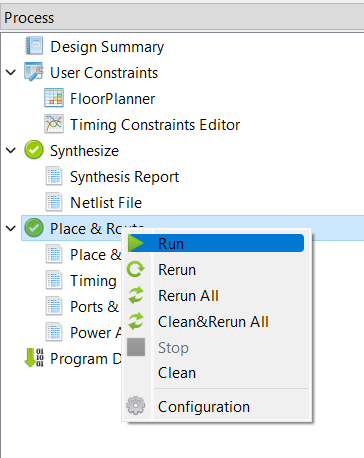
This will result in a bitfile that can be used to program the flash on the Monocle.
Once the Gowin toolchain is installed, open the Gowin programmer application.
Select USB Cable setting and set the port to be channel 1 per the screenshot below and hit the Save button.
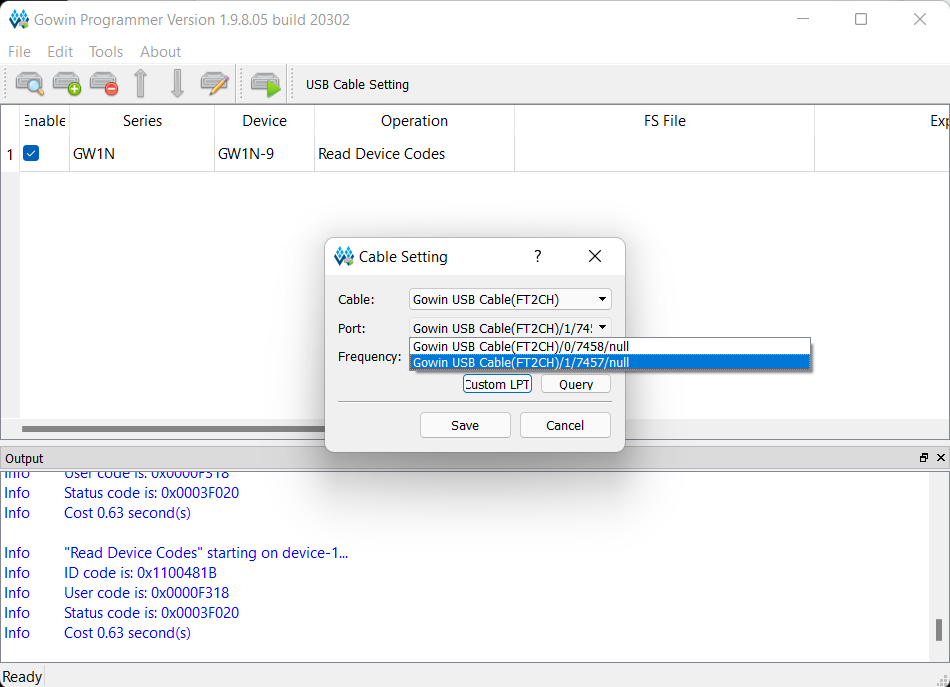
Select the Series to be GW1N, Device to be GW1N-9 and operation to be Read Device Codes
Click on the Green Program/Configure button to read out the ID of the FPGA.
You should get the JTAG ID of the FPGA as seen in the screenshot above.
Future development
Video Compression for faster Video transfer from Monocle to Phone